Claude vs ChatGPT for Making Games
We tested both. Here's which one actually works.
Quick Comparison
| Feature | Claude | ChatGPT |
|---|---|---|
| Shows game automatically | Yes (Artifacts) | No (must click Preview) |
| Works on mobile | No | Yes (buried) |
| Game quality | Better | Good |
| Easy to share | Limited | Limited |
| Best for beginners | Yes | No |
Bottom line: Claude is easier. Neither makes sharing easy. Host on Star for a shareable link.
Can AI actually make playable games?
Yes. Both Claude and ChatGPT can generate working HTML games from a simple prompt like "make me a snake game." The code runs in your browser - no downloads, no installs.
But there's a big difference in how easy each one makes it to actually play that game. And an even bigger gap when you want to share it with friends.
Which is easier for beginners?
Claude: Game appears automatically
Ask Claude to make a game and it shows you a playable artifact immediately. No extra clicks. The game just appears in the sidebar, ready to play.

ChatGPT: You have to find the Preview button
Ask ChatGPT for a game and you get a wall of code. The game doesn't play automatically.
To actually see your game, you need to:
- Find the code block ChatGPT generated
- Look for the small "Preview" button in the top right corner
- Click it to open the canvas view
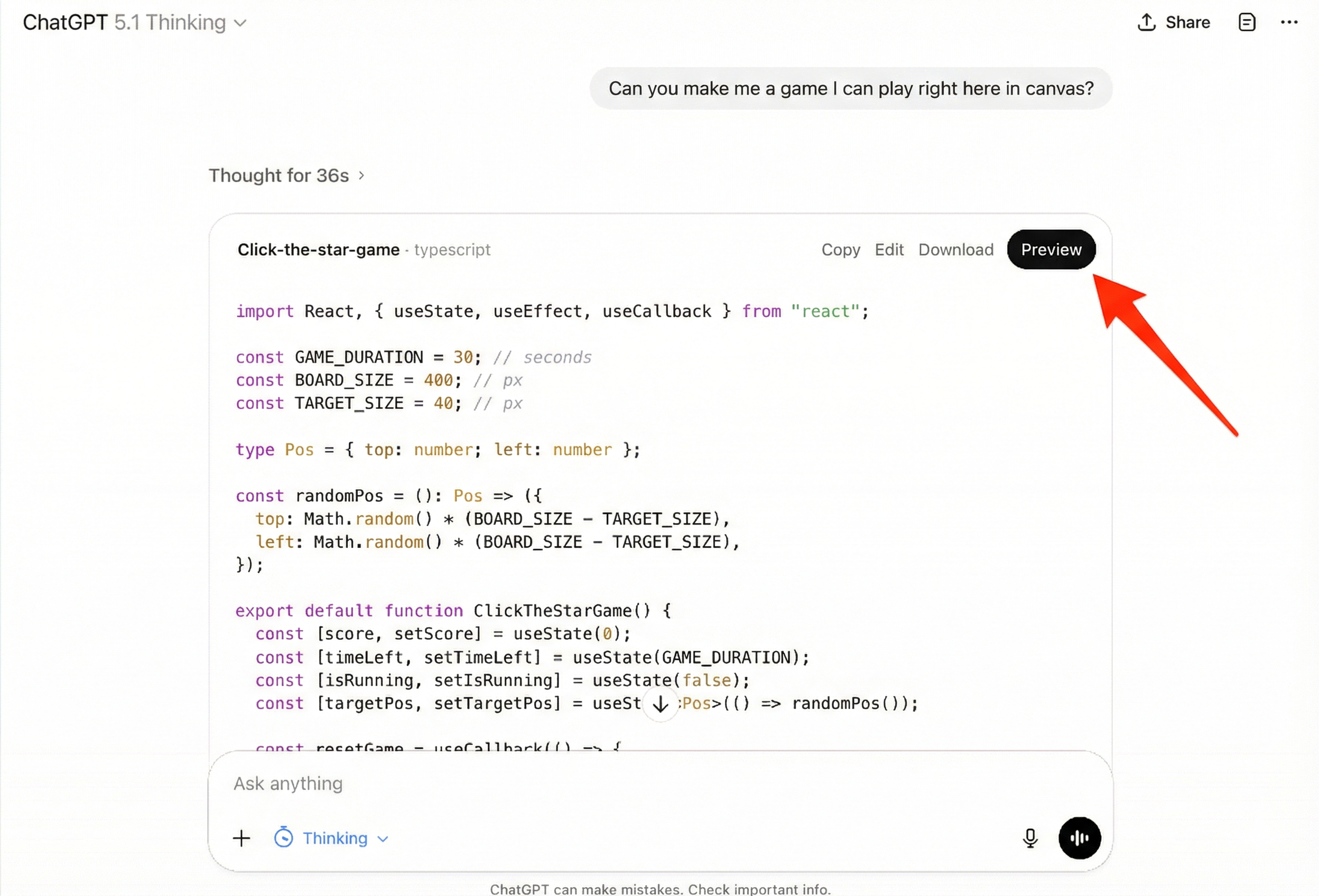
Most people never find this button. They see code, assume it doesn't work, and give up.
Winner: Claude
Zero-click game preview vs hidden button.
Which makes better games?
Both can make working games. Claude has a slight edge:
- Better at following game logic (collision detection, scoring)
- More consistent with iterative requests ("make the enemies faster")
- Fewer bugs on first generation
That said, ChatGPT is still capable. For simple games like Snake, Pong, or quizzes, both work fine. The difference shows up more on complex games.
Winner: Claude (slight edge)
Better game logic, fewer bugs.
Do they work on mobile?
Here's where both fail.
Claude: Artifacts don't run on mobile at all. You can't play your game on your phone.
ChatGPT: Canvas works on mobile, but finding it is a nightmare. The Preview button is tiny and buried. Most people give up before they find it.
If you want to play your game on mobile - or share it with someone who will - you need to host it somewhere else.
Winner: ChatGPT (technically)
It works, but good luck finding the button.
Can you share your game with friends?
This is the biggest problem with both tools.
Claude: You can share the conversation link, but:
- Recipients may need a Claude account
- Artifacts don't always render for them
- No way to track if anyone played
ChatGPT: Same problems:
- Shared conversations show code, not the game
- Canvas doesn't load reliably for others
- No play tracking or leaderboards
If you want a link that actually works - one where anyone can click and play immediately - you need to host the HTML somewhere. That's what Star does.
Winner: Neither
Both have sharing problems. Host on Star for a real shareable link.
Get a shareable link in 30 seconds. Just copy the code and paste it on Star.
Host Your Game FreeWhat about Gemini and Grok?
Google Gemini: The main Gemini chat interface doesn't have artifacts. It just gives you code. Google AI Studio (a separate, more developer-focused product) can preview games, but it's not as seamless as Claude.
Grok: No artifact or preview feature currently. Code only.
If you made a game in either of these, you can still host your Gemini game on Star.
So which should you use?
Use Claude if:
- You're a beginner
- You want to see your game immediately
- You're making something complex
Use ChatGPT if:
- You already have a ChatGPT subscription
- You're comfortable finding the Preview button
- You're making something simple
Use Star's AI Game Generator if: You want the easiest all-in-one experience - describe a game, get it instantly, and share it with a link. No copy-pasting code, no hosting hassles.
Frequently Asked Questions
Is Claude or ChatGPT free for making games?
Both have free tiers that can make games. Claude's free tier includes artifacts. ChatGPT's free tier includes canvas. You don't need to pay to try this.
Can I make multiplayer games?
Not directly. Both tools generate single-player HTML games. For multiplayer, you'd need additional backend infrastructure.
What kinds of games can AI make?
Browser-based games work best: Snake, Pong, platformers, quizzes, clicker games, typing tests, memory games, simple shooters. Complex 3D games or games requiring lots of assets are harder.
How do I share my game after making it?
Copy the HTML code from Claude or ChatGPT, then paste it on Star's hosting page. You'll get a shareable link in 30 seconds.
Key Takeaways
- 1Claude is easier for beginners. Games appear automatically in artifacts. ChatGPT requires finding a hidden Preview button.
- 2Claude makes slightly better games. Fewer bugs, better game logic, handles iteration well.
- 3Neither works well on mobile. Claude artifacts don't run. ChatGPT canvas is buggy.
- 4Neither makes sharing easy. For a real shareable link, host your game on Star.
Made a game in Claude or ChatGPT?
Host It Free on Star30 seconds • Works with any AI tool • No coding required